

In a 1954 speech, the chairman of the US Atomic Energy Commission famously predicted that “our children will enjoy in their homes electrical energy too cheap to meter”. He was wrong, of course; the era of unlimited electricity didn’t arrive. But we are approaching the era of unmetered software.
I don’t mean that software will be free to use (although this will often be the case). I mean it will be increasingly free to create. Rather than being limited to mass-market tools like Gmail, Microsoft Office, and Salesforce, many of us will be supplementing with our own bespoke apps, tuned to our personal needs and preferences.
2025 saw the introduction and rapid improvement of AI “coding agents”, such as Anthropic’s Claude Code. These agents build software step by step, like a human programmer – creating and editing files, testing their work in progress, correcting mistakes. They’re based on the same underlying AI models that chatbots use, but they have access to all of the tools used by human programmers. This allows them to carry out substantial projects without anyone writing or reviewing the code.
These agents aren’t yet up to the task of creating large, complex applications on their own. But there’s an amazing amount of value waiting to be realized via simple applications, targeted for a single person or team. As an example, here’s a problem I recently solved for myself.
Reviewing Spam Emails is an Annoying Chore
I’ve been using Gmail for 20 years, and for 20 years I’ve been annoyed by the process of reviewing spam. (Yes, I am one of those people who systematically checks the spam folder to find the occasional misclassified email.)
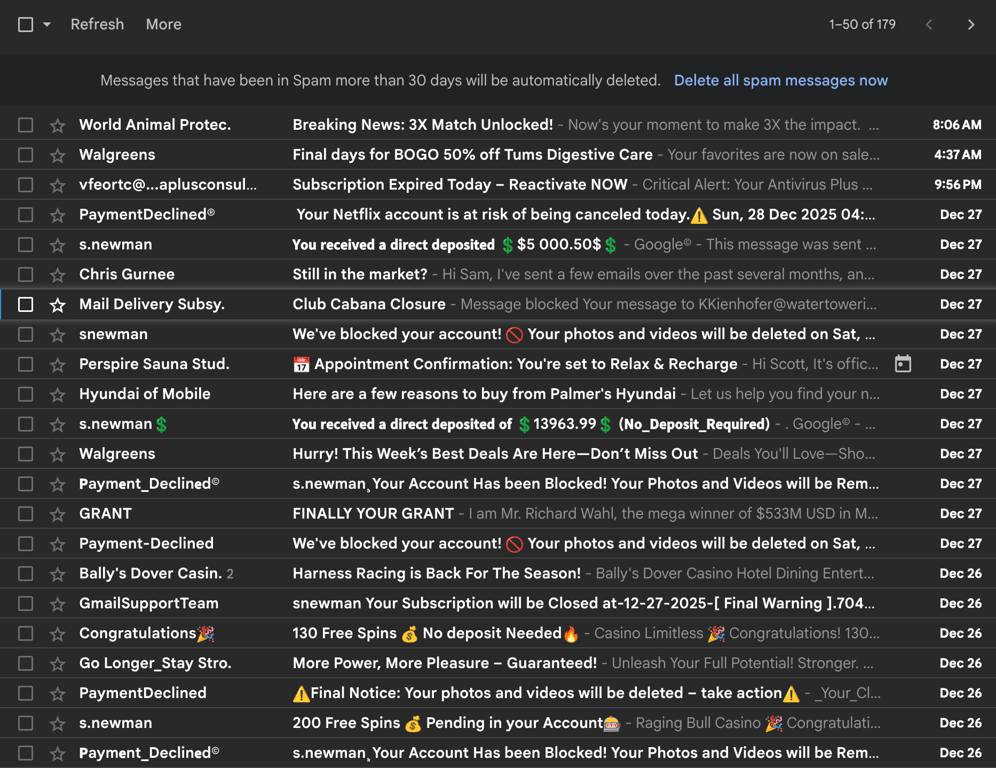
Above is a screenshot of my spam folder. I have multiple gripes:
It doesn’t show the “to” address. I receive email at multiple addresses, and the specific address is an important hint as to whether a message is spam.
Similar messages are scattered all over the list. For instance, in this screenshot there are four bogus messages with a sender named “Payment Declined”, but they’re separated and so I can’t easily recognize them as a group.
Gmail only displays 50 messages at a time. After I’ve reviewed them, I have to wait for it to load the next 50 – which is weirdly slow.
For each message that isn’t spam, I need to go through multiple steps: click to select it, move the mouse up to the toolbar, click “Not spam”, and wait for Gmail to process the action.
These annoyances add up to make cleaning the spam folder a substantial chore. It’s a first-world problem for sure, but I’ve always felt there was room for improvement.
My Personal Version of a Better Way
Here’s the page I had Claude build:
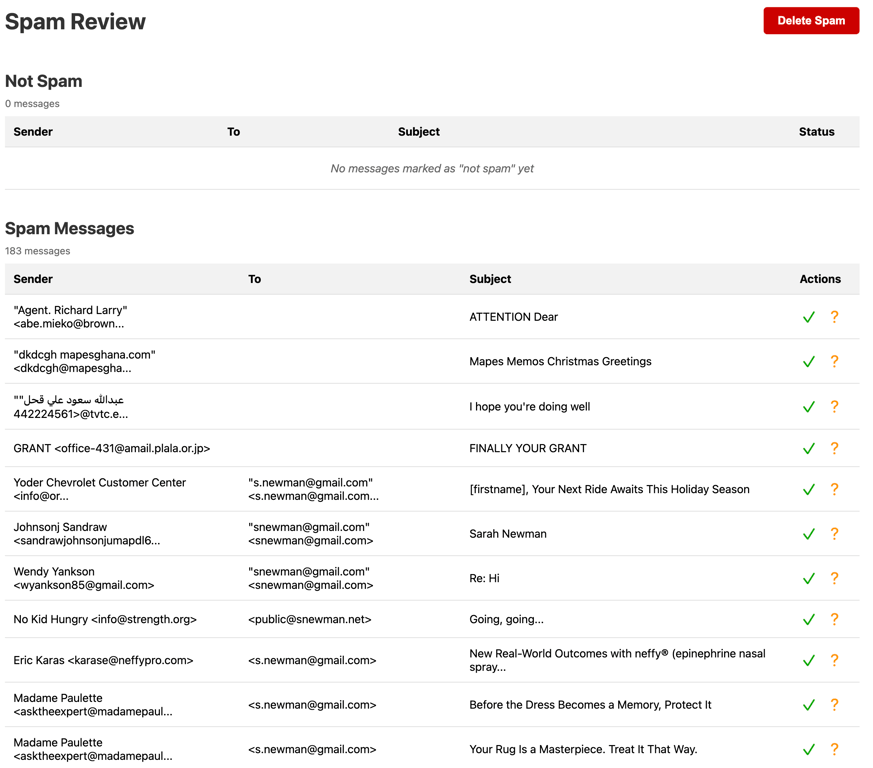
To use this page, I scroll through and click the green checkmark for each message that isn’t spam. Then I click the big red Delete Spam button at the top, and it deletes all of the messages I didn’t flag. (Ignore the red question marks, they’re an unimportant detail.)
This addresses all four of my complaints:
The “to” field is displayed. This allows me, for instance, to spot messages addressed to s.newman@gmail.com – which are certainly spam, as I never spell my email address that way. (I don’t know for sure why spammers target this address, I can only guess that they’re randomly generating plausible addresses. It reaches me because Google ignores periods in email addresses.)
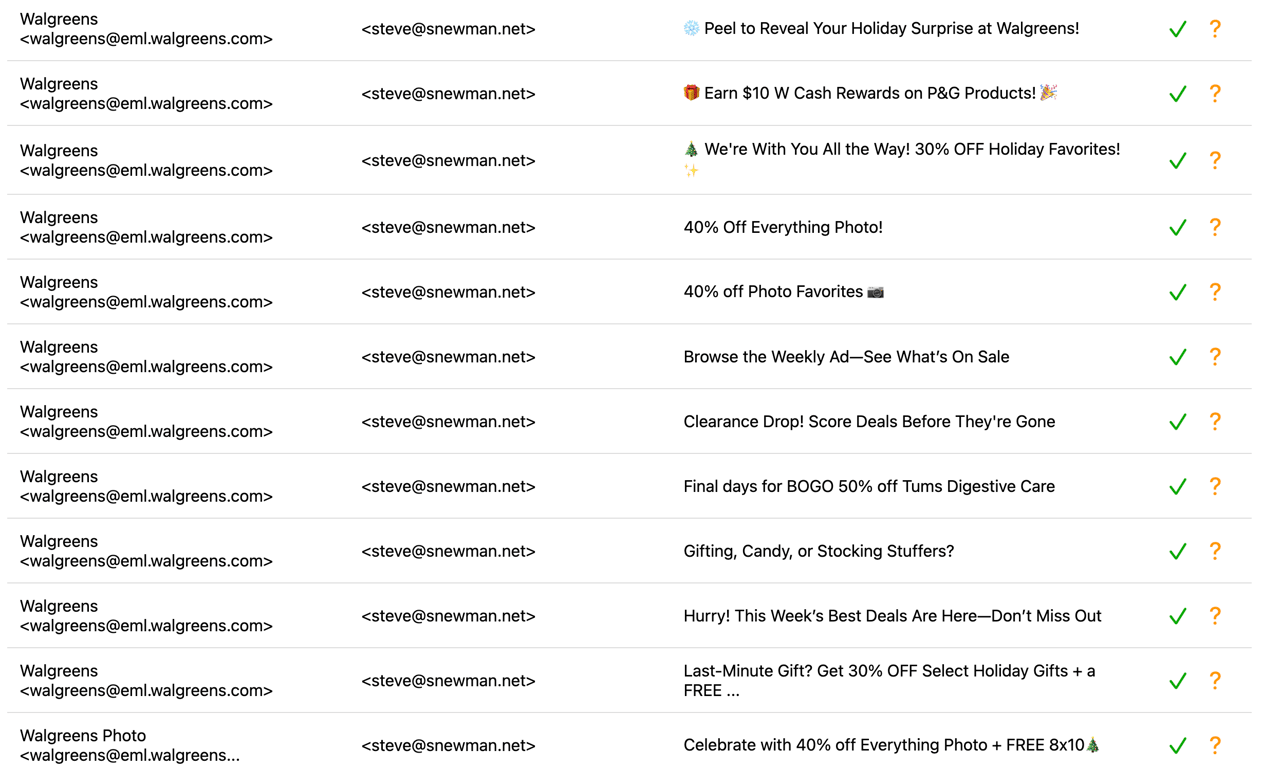
The messages are sorted, creating large groups of similar messages that are easy to scan visually. For instance, here are a bunch of messages from Walgreens1 that all arrived at different times, and so would have been scattered across the Gmail view:
The entire list is displayed, not just the first 50 messages. I can scroll without waiting for additional messages to load.
To mark a real message as not-spam takes just one click, with no waiting. (When I click the green checkmark, the message gets moved from the spam folder to my inbox in the background, without my having to wait for it.)
This page isn’t pretty, but it’s streamlined and functional in a way that works for me. Other people might not like it – but that’s just fine. When software development becomes approximately free, it becomes worthwhile to build software for an audience of one.
This new spam interface saves me, like, 3 minutes per week. It’s not that big a deal. But that’s the point: coding agents are becoming so good that its worth my time to solve a three-minute-per-week problem. Over the course of a year, that adds up to a few hours2. It took well under an hour of my time to create, and most of that was for “dumb” reasons that will soon be ironed out. By the end of 2026, as the tools improve and I get better at using them, a project of this scope will probably take only a handful of minutes.
Where Things Go From Here
There are still kinks in the experience of bespoke software development. AI agents have become quite good at writing code, but there’s an art to knowing what to ask for and how to ask for it. Getting the code onto a server and giving it access to your data (such as, in the example above, my spam mailbox) adds further hurdles. I’ll talk about this and other limitations in upcoming posts. For now, the tools are most easily used by professional software developers, and aren’t as smooth as they could be. But a lot of people are working hard to change that.
In the meantime, early adopters are reporting dramatic results – and not all of these early adopters are software engineers. For instance, AI policy analyst Dean Ball writes:
One year on from December 2024, models have become fantastically useful. As I have discussed recently, frontier coding agents, and especially Claude Opus 4.5, have essentially become autonomous software engineers. In just the last few weeks, the best models have done software engineering work for me that would have cost tens of thousands of dollars had I hired humans to do it.
We’ve all spent our lives putting up with one-size-fits-all apps. We’re well trained at conforming our workflows to Gmail’s quirks, Excel’s limitations, Salesforce’s complexity. Now the cage door has been opened, but we’re not yet used to walking free. “The limiting factor is your imagination” is a trite thing to say, but it applies here: we will have to learn to mold software to our needs and tastes, rather than molding ourselves to the software.
People like Dean are entering a brave new world. That world is still a work in progress. But it’s going to progress quickly. For people who are leaning in, daily work life is going to look very different by the end of 2026 – a topic I’ll return to in a future post.
Thanks to Abi Olvera for suggestions, feedback, and images.
I don’t patronize Walgreens, but their unsubscribe link is broken, so I keep getting their spam.
100% agree that for people who are good at products, the plummeting cost of creating custom software is a game changer. I'm writing this comment inside the custom bookmark manager I wrote because I wanted features that aren't available in any commercial product, and all of a sudden, making my own high-end app just isn't that hard.
I do wonder, though, how useful that will be for non-technical people. I've had so many times when a user came to me with a pain point (which was usually valid) and a proposed solution (which was almost always wrong). I suspect it's easier to solve the "make any software you want" problem than the "designing products is hard" problem.
I love that you created a personal app to work around some of Gmail's limitations. What did you use to wire the app up to Google? Does this work with a personal account, or does it have to be Workspace?